AI operations desk
Stop being a task janitor.
Tricorne reads your inbox and your calendar, sorts what actually matters, and writes the replies in your voice, then hands you your day.
For owner-operated service businessesGmail & OutlookYou approve before it sends
Certificate of insurance needed before Friday closing
The account
Where the week actually goes
Owner-operators lose ten to twenty hours a week to work that is not the work before a single client has been served.
How a message moves
Five steps, and one of them is you
Gmail or Outlook, mail and calendar. Tricorne reads the thread, not just the last message.
Newsletters and bulk mail are recognised by rule before any model runs, so that sorting costs you nothing. Everything else is classified: category, priority, sentiment, and how confident it is.
A reply written from your tone, your policies, your services, and the history on that client. Ask it to be shorter or to mention the renewal date, and it edits rather than starts over.
It stops. By default nothing reaches a client until you have read it and pressed approve. Delayed auto-send is opt-in, and off until you turn it on.
Out through your own mailbox, from your own address, in your own voice.
The desk
One place your business is actually run from
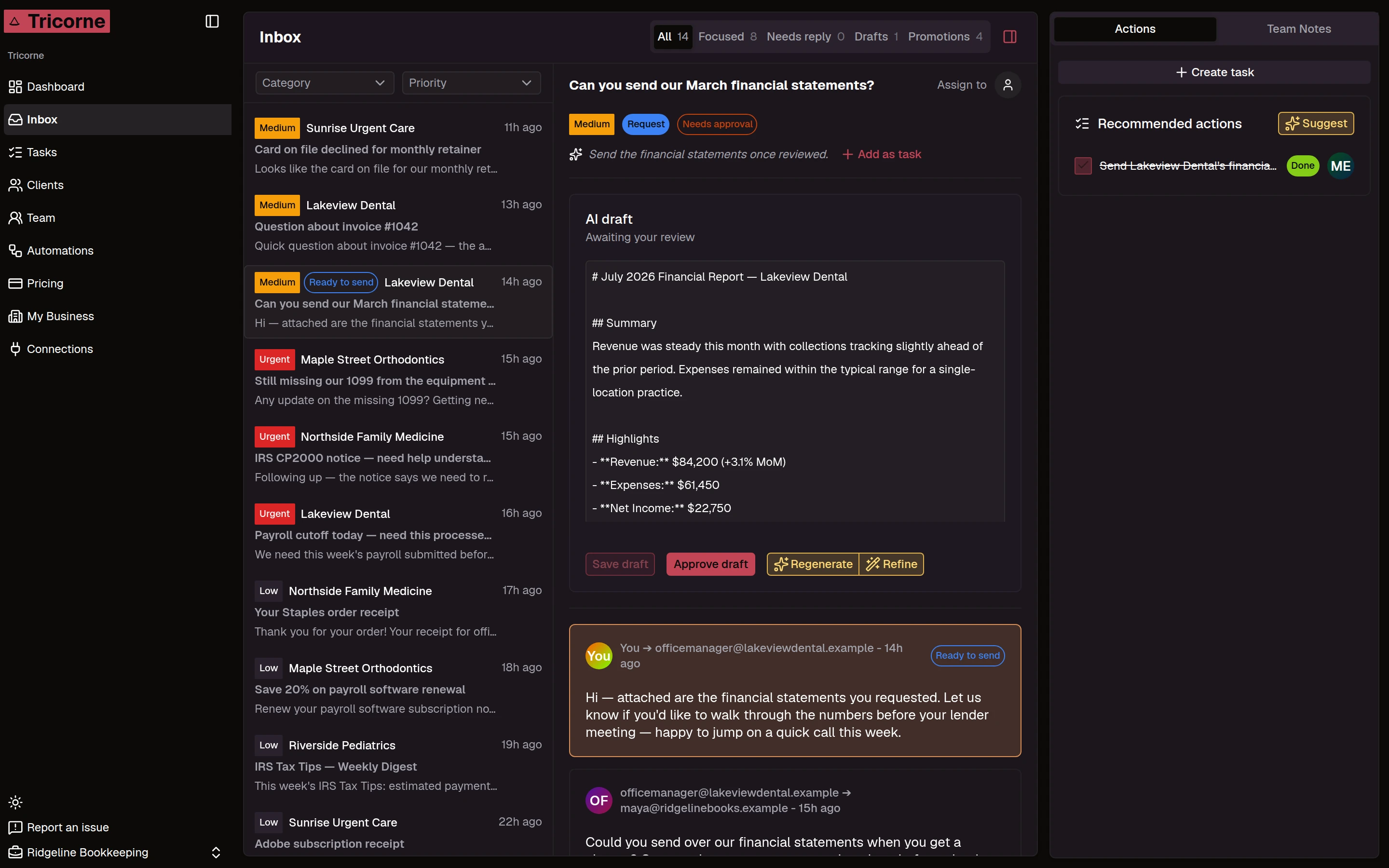
A reply, waiting on you
Tricorne writes from your business context and then stops. Approve it, refine it in place, or regenerate. Sending is your keystroke unless you opt into delayed auto-send.
Your team
One desk the whole business works from
An assistant that only helps one person just moves the bottleneck. Tricorne is a shared workspace, so the business runs even when you are not the one at the keyboard.
One workspace, not one inbox each
Your team sees the same threads, the same clients and the same tasks. Nothing important lives only in one person’s mail.
A thread belongs to somebody
Assign a conversation to a person and it stays assigned, so two people never answer the same client twice, and nobody assumes someone else has it.
Talk about the client, not in front of them
Internal notes sit on the thread where the context is. Your client never sees them.
Changes land live
A task ticked or a thread claimed shows up on everyone else’s screen straight away, without a refresh.
Invite in seconds, control what they get
Owners manage connections, billing and business settings. Members work the desk. Invite by email and revoke the same way.
Control
It drafts. You decide.
The reason to trust an AI with your client relationships is that sending is your call, not the model's.
Every reply is held by default
A draft sits in the thread until you approve it. Tell it to be shorter or to mention the renewal date and it revises that draft rather than writing a new one. Delayed auto-send is an opt-in on routine mail.
It tells you when it is unsure
Every classification carries a confidence score and one of three escalation levels: handle it, review it, or put it in front of a person. You set what happens at each level.
Your workspace is your own
Isolation is enforced in the database, not in application code. A query that arrives without a workspace context returns nothing at all.
Leaving is not a trap
Disconnect a mailbox whenever you like. Everything already in your workspace stays yours: mail, events, files.
Connections
Wired to what you already use
Mail and calendar connect per workspace, are stored encrypted, and can be revoked at any time. QuickBooks connects one client company at a time, the way an accounting firm actually works, and is read-only.
This list grows by trade. The tools a brokerage lives in are not the ones a bookkeeping practice lives in, so new connectors are chosen for the vertical asking for them. Tell us what your business runs on and it goes on the list.
And the handoffs between them
Connecting apps is the easy half. The work you actually lose time to is carrying the same information from one to the next, so Tricorne runs that for you and shows its work.
- A form comes inYour intake form is submitted by a prospect or a client.
- The record writes itselfFields map onto a client record: created if they are new, updated if they are not.
- Your CRM gets the contactThe same details are pushed straight into your CRM, with duplicates handled.
- The reply is draftedAn acknowledgement with the right link and the right policy language is written and held for you.
- The run is loggedEvery step is on the record, so you can see it happened rather than hoping it did.
Your trade
It knows what your work is made of
The inbox is the same everywhere. What sits behind it is not, so Tricorne ships with the shape of your trade already in it.
- Typeform intake becomes a client record with the fields already filled.
- Upload a declarations page and get structured fields back, each with a confidence score.
- Compare carrier quotes side by side, pick the winner, and draft the client email from it.
- Connect each client company in QuickBooks separately, the way an accounting firm actually works.
- Pull a month of financials into a drafted client report.
- Deadlines, payroll cutoffs and filing dates surface on the morning briefing.
Straight answers
The things you were going to ask
Will it email my clients without me?
Not unless you turn that on. The default is hold-for-approve: every draft sits until you press send. Owners can opt into delayed auto-send on routine mail, with a waiting window so you can stop any of them. Auto-send starts off.
Does it write like me, or like a chatbot?
You give it your tone, your sign-off, your standing policies and your services once, in My Business. Every draft is written from that plus the history on the client. If a draft is off, tell it what to change and it edits that draft rather than starting a new one.
What happens to my newsletters and junk?
Bulk mail is recognised from its headers and sender before any model is called, so it is sorted for free, costing neither credits nor your included messages.
Can my team use it with me?
Yes. Invite teammates as owners or members, assign a thread to a person so two people never reply at once, and leave internal notes on a thread that your client never sees.
What if I want to leave?
Disconnect any mailbox at any time. Everything already in your workspace stays yours: mail, events and files.
Is my workspace separate from everyone else’s?
Every table carries a workspace id and is enforced at the database level, not in application code. A query that arrives without a workspace context returns nothing at all, and that is covered by a regression test.
Book a demo
Get your mornings back
Fifteen minutes on your real inbox, and an honest answer about whether this is worth your money. If it is not a fit we will tell you.